
Skip to the content

Everything your dining room runs on, in one login.

Parlor is the reservations book, the guest email, the private events and the ticketed nights, right through to the door. I built it for my own rooms because nothing on the market did all of it without taking a cut of every cover.

30 days of Pro. No card needed.

  • No per-cover fees. Ever.
  • No contracts. Leave any month and take your guest list with you.
  • Your Square account. Your money.

Built in and for Miz Kathi's, Wildwood, Florida.

Four bills, one login.

Most independent rooms pay for a reservations system, an email tool, a ticketing site and something to keep private-event enquiries straight. None of them talk to each other, so the guest who books a table, buys a Christmas Tea ticket and opens your newsletter is three strangers.

No per-cover fees. Ever.
A flat monthly price per location. A busy Saturday costs you the same as a quiet Tuesday.
No contracts.
Month to month. Leave any month and take your guest list with you.
Your Square account. Your money.
Ticket money goes straight into your own Square account. Parlor never holds it.
What you pay now, each monthPut in your own numbers. The figures here are typical published prices, September 2026.
ReservationsOpenTable, Resy, Tock
Guest emailMailchimp, Klaviyo, at about 10,000 contacts
Private eventsPerfect Venue, Tripleseat, a spreadsheet
TicketsEventbrite, SimpleTix. Usually free each month; the fees land on your guests.
You pay now$498 a month
Parlor Pro$199 a month

That's $299 a month back, or $3,588 a year.

And a $40 ticket carries a Parlor fee of $1.59 on Pro, where Eventbrite's published rate is 3.7% plus $1.79, about $3.27.

A day at a room that runs on Parlor.

Follow one day at The Linden Room, a made-up tea room and supper club. The examples below are built from Parlor itself: the real ticket designs, the real seating and fee rules, the real screens, all working on sample guests.

10:00in the morning

Parlor notices Thursday is quiet, and writes the email.

Every morning at ten, Parlor reads the next week of your book against what the room can seat. A night under 40% gets a card on the Mail tab, and one tap turns it into a draft with real, bookable times from your own book in it.

It never sends by itself. You read it, change what you like and press Send, and even then you have ten minutes to take it back.

Fill the RoomSample venue and guests

Thursday dinner is 31% booked (18 of 58 seats).
Suggested at 10:00 this morning. Nothing has been sent.

Party size in the email
From The Linden RoomA table for you on Thursday?Thursday dinner has tables open at The Linden Room. Pick a time in one tap.

We have a few tables open for dinner on Thursday, and we would love to see you. Tap a time below to book it.

Open tables Thursday, for 2

See all times

See you soon,
Eleanor at The Linden Room

Times come from your book when the email goes out. Tap one to see where it takes a guest.

  • A guided editor for people who aren't designers, or bring your own HTML or ZIP.
  • Claude writes with you: new drafts, or edits to the email you already have, in plain prose.
  • Import from Mailchimp, consent records included, and a starter library of templates.
  • Sign-up forms, a website popup and a QR card for the counter.
  • Automations: a birthday club, anniversaries, a welcome, a thank-you after a visit or an event, and a note to guests you haven't seen in a while.
  • A marketing calendar, a check before every send, and your important links one tap away.

11:30in the morning

Describe the event the way you'd tell your staff.

Type it or paste the flyer. Claude fills in the whole event for you to check: the dates, the ticket prices, the room, how parties are seated, the questions to ask at checkout and the ticket style.

It only uses rooms you really have and prices you really gave it. When something is missing or doesn't match, it says so in a plain sentence instead of guessing, and nothing is created until you press Create.

Describe your eventExamples, not a live call

Pick what the owner typed

What you type

What Parlor sets up for you to check

  • The kitchen prep sheet: headcount, ticket types and every dietary need by table, summarised in thirty seconds of reading.
  • An event marketing series: the announcement, a spotlight, a last call and a thank-you, written for you to edit.

2:00in the afternoon

Tickets go on sale, with a price nobody has to be surprised by.

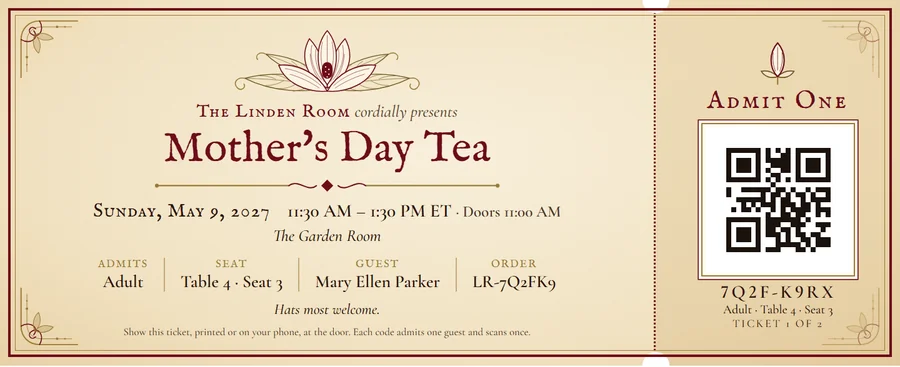
Adult and Child prices, several dates, promo codes, and one all-in price on every page, so the number a guest sees first is the number they pay. Each guest gets their own QR code by email, and can print their tickets at home in the style you picked for the event.

Seven styles, each drawn for Parlor. Tap through them: these are the real printed tickets, rendered by the same code that prints a guest's.

Printed ticket styles1 of 7

Cream card stock, burgundy and antique gold, an engraved magnolia and a double border.

Open full size
  • Will-call and a box office for phone and walk-up orders.
  • A seating board of every party at every table, with Plan the seating to tidy it before the night.
  • Refunds by the ticket or the whole order, back to the guest's card through Square.

3:15in the afternoon

Parties book, and the room fills without stray empty chairs.

Sell a seated event chair by chair and you know what happens: a three at a table of five, a two nobody can put beside them, and two chairs empty all afternoon. Parlor sells by party. Each party sits whole at one table, and it goes to the table it fits best, so the small gaps are kept for the small parties.

Guests can tick “happy to share a table”. Only people who ticked are ever seated together, and you choose per event whether sharing is never, by agreement, or always.

A party booksA real room: four tables of 5, two of 8

Party size

First table that fits

Each party gets the first empty table big enough

Parlor

Best fit, sharing only by agreement

Tap a party size to book a party into both rooms.

6:45in the evening

At the door, one scan says who, where, and whether.

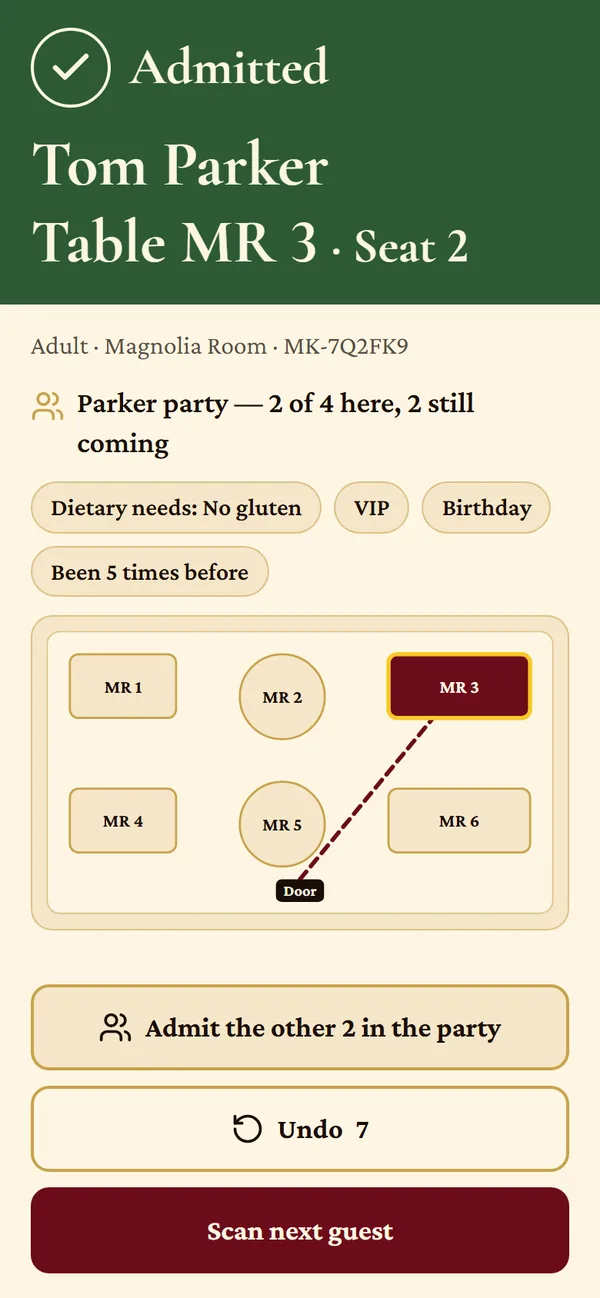
Parlor Door is the host's app on any phone. Scan a ticket and the screen fills with the guest's name, their table and seat, a map from the door to the table, and anything worth knowing: a dietary need, a birthday, a regular.

A ticket that was refunded, or already used, says so in words the host can act on. When the signal drops, the door keeps working and catches up when it's back. Walk-ups can be sold a seat right there, cash or card, and a table can be held for someone running late.

Parlor Door after a scan: Admitted, Tom Parker, Table MR 3, Seat 2. Parker party, 2 of 4 here. Dietary needs: no gluten. A map shows the path from the door to table MR 3.

Scan a ticketScreens from Parlor Door, sample guests

7:30in the evening

Dinner service, with an honest answer at the host stand.

The book, the floor and the waitlist are one picture. When a party walks in, the wait Parlor quotes comes from the tables actually on the floor and how far along each one is, not from a guess. When their table is ready, one tap sends a text, only to guests who agreed to one, and never twice.

The text a guest gets when their table is ready.

Your own booking page

Guests book on a page with your name on it, with times that respect each service's last seating. They can change or cancel it themselves from the confirmation email.

The waitlist

Quotes that hold up, a board that updates itself, and a record of how close each quote came to the real wait, so you learn your own room.

The floor

Tables move through seated, drinks, mains, dessert, check, paid and reset, so the book knows when a table really comes free.

Reminders and reviews

A reminder the day before, and a review request after the visit, each sent once and only once.

A weeklater

Did the email fill any tables? The report counts bookings, not opens.

Opens stopped meaning much when Apple Mail started opening everything by itself. So Parlor's report leads with the tables and guests booked by people the email went to, however they booked: the email's buttons, the phone, or walking in.

A small group from any list of 200 or more is quietly held back, so the report can tell you how many of those bookings the email probably caused, or say plainly that it's too early to tell.

Bookings from this emailSample report

Booked: 14 tables, 41 guests

Alwaysbetween services

Private events, from the first enquiry to the final invoice.

Every wedding shower, rehearsal dinner and company lunch enquiry lands in one pipeline with the guest's whole history beside it. Claude reads the enquiry and sorts it, so the ones worth a call today are at the top.

Pipeline

Every enquiry and booked event by stage, with the notes, files and emails that go with it.

Tasks and callbacks

Who promised to ring whom, and by when, so nobody is left waiting for a quote.

Deadlines

Quotes due, menus due and event dates, sorted into overdue, the next three days and the week ahead.

Reports

Covers, outcomes, where your bookings came from and how hard the room worked.

One price per location, month to month.

No per-cover charge, no contract, and setup is optional. Pay yearly and two months are free.

Tickets

For venues that only sell tickets

Free

Always

  • Tickets, box office, door scanning, printable styles and party seating
  • Your own sign-in page at yourname.parlorhq.app, with your logo and colours
  • Email to ticket buyers, up to 500 subscribers
  • 10 Claude actions a month
  • Ticket fee 3.5% + $0.99
  • Reservations and the private-events pipeline
Start free

Essentials

For cafés and small restaurants

$99a month


  • Reservations, booking page, waitlist and floor
  • Everything in Tickets
  • 2,500 subscribers, 500 texts a month
  • Basic automations
  • 50 Claude actions a month
  • Private-events pipeline, view only
  • Ticket fee 3% + $0.99
Choose Essentials
The 30-day trial

Pro

For tea rooms, event rooms and full service

$199a month


  • Everything in Essentials
  • The full private-events pipeline
  • Fill the Room, the Covers Ledger, event series and every automation
  • 10,000 subscribers, 1,500 texts a month
  • 300 Claude actions a month
  • Send from your own domain, no Parlor branding
  • Ticket fee 2% + $0.79
Start your free trial

Group

For restaurant groups

$399a month

3 locations, then $99 each

  • Everything in Pro, at three locations
  • 25,000 subscribers shared
  • 3,000 texts a month
  • 1,000 Claude actions a month
  • Ticket fee 1.5% + $0.79
Choose Group

Need more? 5,000 more subscribers are $25 a month, 1,000 more texts $25 a month, 500 more Claude actions $19 a month, and we'll set you up and import your guests for $299, once. Email sends are 4 times your subscribers a month on Tickets, 8 on Essentials and 12 on Pro and Group.

What a ticket really costs your guest.

Parlor only takes a cut where money moves through it: tickets bought online by card. Nothing on cash at the door, nothing on free or comp tickets, a flat 49 cents on tickets of $10 or less, and never more than $9.95 on any ticket. If you refund a ticket, Parlor's fee goes back too.

The fee applies from your first ticket sold online, during your free trial as well as after it. It's billed to your card on file as soon as $50 of fees has built up, and otherwise once a month.

You choose, event by event, whether your guests pay the service fee or you absorb it. Either way the first price a guest sees already includes it. That's been the law since May 2025, and Parlor works it out for you on every ticket page.

The figures here are worked out by the same code that prices a real checkout. Square's processing is taken at its standard online rate of 2.9% plus 30 cents; your own rate may differ.

Who pays the service fee

The price your guest sees first, with 7% sales tax

$46.03

The first 25 venues keep 40% off for as long as they stay.

Parlor is new to everyone but my own rooms. If you come on now, while it's still being shaped by the people using it, the discount doesn't expire.

  • 40% off your plan, every month you stay.
  • The Pro ticket fee, 2% + $0.79, on any plan.
  • We set you up and import your guests, free.
  • In return, if Parlor earns it, a few honest words we can share.

Pro for a founding venue
$119.40 a month

Essentials $59.40 a month

Book a demo.

Tell me a little about your room and I'll show you Parlor on a video call, set up for the way you run things. Half an hour, no slides.

Or skip the call: the free trial is the whole of Pro for 30 days, no card needed (a card is needed only to sell tickets online).

What would you like to see?

I'll use this only to arrange the demo. See the privacy policy.

Questions owners ask.

Can I take my data with me if I leave?

Yes. It's your guest list, not mine. Ticket orders export to a spreadsheet from the Tickets tab whenever you like. For everything else, your guests, bookings and email subscribers, email me and I'll send it all as spreadsheet files you can open anywhere or import into whatever you move to.

Do I need Square?

For selling tickets online, yes. Ticket money goes straight into your own Square account, so Parlor never holds your money. Parlor's ticket fee is billed separately to the card you keep on file with Parlor, on the same bill as your plan, and charged sooner if it reaches $50 in a month. Reservations, the waitlist, email and private events all work without Square. Cash sales at the door are recorded in Parlor and pay Parlor nothing.

Is there a contract?

No. Plans are month to month, or yearly if you'd like two months free. Stop a monthly plan any month and you won't be charged again, apart from ticket fees already earned; a yearly plan runs to the end of the year you paid for.

What counts as a subscriber?

Someone who has agreed to get your emails and hasn't unsubscribed. People who unsubscribe, addresses that bounce and guests who have never opted in don't count, so your bill doesn't grow with a list of people you can't write to.

Is there a per-cover fee, or a fee on reservations?

No. Bookings are part of your monthly price, however many you take. The only per-item fee is on tickets bought online by card, and it applies from your first online sale, free trial included.

How much can I use Claude?

Claude is included in every plan and counted in actions: one action is one draft, one event set up from a description, one seating plan explained. Tickets includes 10 a month, Essentials 50, Pro 300 and Group 1,000, and 500 more are $19. Claude only ever drafts. Nothing it writes is sent or created until you've read it and pressed the button.

What happens when my trial ends?

Before the 30 days are up I'll ask which plan you want. Starting the trial takes no card, and nothing is charged unless you choose a plan and add one. If you choose a plan during the trial, your plan is first charged the day the trial ends. If Parlor isn't for you, just don't choose one, and ask me for your data. One exception to "no card": selling tickets online needs a card on file, even on the free Tickets plan, because that is where Parlor's ticket fee is billed. The ticket fee is not part of the trial: it's charged from your first online sale, whenever $50 of fees has built up and otherwise once a month, and it's still billed if you leave when the trial ends.

How do I cancel?

Email me and it's done, with no exit fee and no questions you don't want to answer.

Who's behind Parlor?

I'm Joel. I run Miz Kathi's in Wildwood, Florida: a café, a sweetery and the Magnolia Room, where we hold teas and private events. I built Parlor for us after years of paying four companies to do one job badly. Miz Kathi's still runs on it every day, and so will you.